How to Recover Data from Dead M.2 SSD?
-
 Written By Kees Jan Meerman
 -
 Updated On Jun 25, 2026
 -
 Min Read 3 Min
 - Share this

Summary: M.2 SSDs are a smart, fast, and efficient solution for data management. However, like regular SSDs, M.2 SSDs are not immune to failure. They can fail due to software or hardware issues, leading to unexpected data loss. In this blog, we’ll cover all possible data recovery methods, from DIY techniques to data recovery software and professional data services. We will also discuss the differences between SSDs and M.2 SSDs, FAQs around M.2 SSD data recovery, and how to recover data from dead M.2 SSDs.
The M.2 SSD is a compact-sized and high-speed data storage device. These new-age SSDs are ideal for modern laptops and desktops.
However, M.2 SSDs, like other storage devices, are not immune to hardware and software issues.
And when these issues strike, data loss is often the major concern.
Don’t panic though. Data recovery from a dead M.2 SSD is possible.
In fact, you can use various DIY methods to recover data from dead M.2 SSD
Let’s dive right in.
What is a Solid State Drive (SSD)?

An SSD is a type of storage media that uses flash memory to hold data. Traditional Hard Disk Drives (HDDs) rely on spinning disks to read and write data. But SSDs have no moving parts. This design makes SSDs faster, more durable, and quieter than HDDs.
Thanks to their lack of moving parts, SSDs can start up quickly and transfer data at high speeds. However, like any storage device, they can still develop issues, especially when the SSD memory cells wear down with regular use.
What is an M.2 SSD?
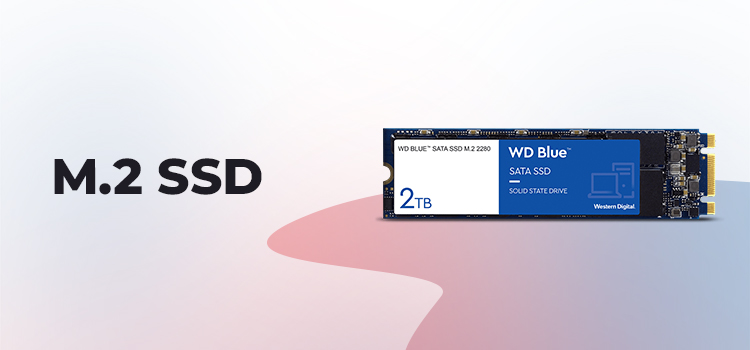
An M.2 SSD is a newer, faster version of an SSD that connects directly to the motherboard using a special M.2 slot. Often, M.2 SSDs are connected through the PCIe (Peripheral Component Interconnect Express). This allows for high-speed data transfers.
Since M.2 SSDs are compact and powerful, they’re especially popular in laptops and small desktops. They offer excellent speed and performance. However, if something goes wrong, recovering data from an M.2 SSD can be trickier than from regular SSDs.
Why?
M.2 SSDs are different from standard SSDs in size, speed, and often in data interfaces. Traditional SSDs usually connect through SATA, but M.2 SSDs can connect via PCIe. This results in significantly higher speeds. However, that’s not all. The differences between regular and M/2 SSDs also impact data recovery.
How is M.2 SSD Data Recovery Different?
The unique structure and connectivity of M.2 SSDs means data recovery can be more complex.
Traditional SSDs use a straightforward structure. This allows recovery software or hardware repairs to retrieve data. However, the high-speed and compact M.2 SSDs require specialized techniques and software. Especially, if you are dealing with a completely unresponsive (dead) drive. We will talk about these techniques and software later in the blog.
Why You Might Need Data Recovery from an M.2 SSD?
If your M.2 SSD stops working, you can’t access the data stored on the drive. Irrespective of what causes the drive failure, you’d need to recover your data from the M.2 SSD.
Some other common reasons for needing M.2 SSD data recovery include:
- Hardware Failure: Circuit or NAND flash issues can lead to complete drive failure.
- Firmware Errors: Faulty firmware updates can corrupt the drive’s data.
- Physical Damage: Damage from overheating or power surges can render M.2 SSDs unusable.
- File System Corruption: Logical errors from system crashes can make data inaccessible.
Regardless of the cause, data recovery methods are available to help recover data from M.2 SSDs.
Methods to Recover Data from an M.2 SSD
Let us explore some of the methods for recovering data from an M.2 SSD. You can start with the first method and continue until you get your data back.
Method 1. Using Backup Copies
The simplest method to recover data from M.2 SSDs is to restore the data from backup copies.
Here’s what you need to do:
- Connect the backup source and the device requiring recovery.
- Open your file system and copy files from the backup to the intended location.
- Verify file integrity by opening restored files.
Important: This method only works when you do have a backup available. With regular backups, the data recovery process becomes simple.
Method 2. Disk Management and Command Prompt
Sometimes, the data on your M.2 SSD is detected but you cannot access it via regular means. In such cases, disk management tools or command prompt commands can help.
Follow the steps below to recover your M.2 SSD data:
- Right-click on This PC > Manage > Disk Management.
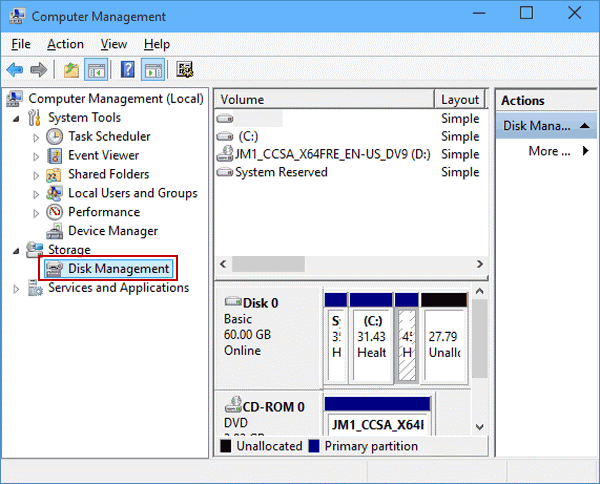
- Check if the M.2 SSD appears in the list.
- If yes, use Command Prompt to repair the disk. Open it and type chkdsk /f followed by the M.2 SSD drive letter.
- Let the process complete and restart the system.
- This method is best suited for when the M.2 SSD is detected but facing logical errors.
Method 3. Physical Troubleshooting Techniques
If hardware issues are the potential cause of data loss from your M.2 SSD, you can check and attempt some basic fixes.
Physical checks help if the issue is due to poor connectivity or minor hardware problems.
Here’s what you can do:
- Remove the M.2 SSD from the slot.
- Inspect for visible damage and clean any dust.
- Reinsert the drive firmly back into the motherboard.
Pro Tip: You can also check for firmware updates on the manufacturer’s site and update if available.
Method 4. Using Stellar Data Recovery Software
Many times DIY data recovery methods fail. In such cases, you need to use data recovery software. Stellar Data Recovery is a powerful tool for retrieving data from an M.2 SSD.
You can recover your data from the M.2 SSD using Stellar Data Recovery in 3 simple steps:
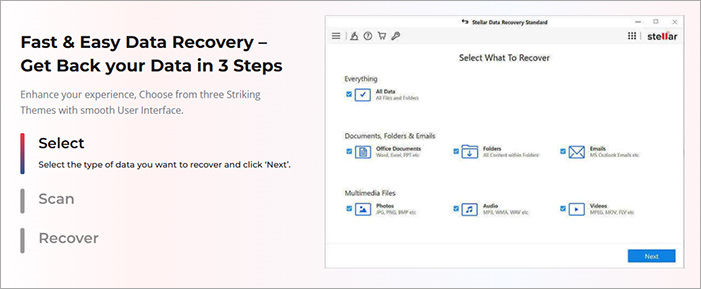
Stellar Data Recovery software is user-friendly and effective for most data recovery needs. It can be used to recover data from M.2 SSDs as well as NVMe SSDs as well.
Method 5. Stellar Data Recovery Services
For completely dead or physically damaged M.2 SSDs, even software recovery won’t work. In such extreme cases (or when the data is critically important), you need professional services. Recover data from dead M.2 SSD with expert help for the best chance of successful retrieval.
To avail Stellar’s SSD data recovery services:
- Visit the Stellar website and answer a few simple questions about your M.2 SSD and the issue you’re facing.
- Request a free quote by providing the necessary details about your device.
- Our data recovery specialists will contact you to explain the recovery process and answer any questions you may have.
- You can either ship your M.2 SSD to us using our free shipping service or visit the nearest Stellar Data Recovery Center to drop off your device.
- Once your device is in our hands, our experts will begin a thorough analysis.
- Afterward, we will send you a detailed report on the findings and, upon your approval, proceed with the data recovery process.
With these professional services, you have the maximum potential for data recovery.
Recovering data from a dead M.2 SSD can be complex but achievable using the right tools and techniques. From DIY methods or professional help, this guide helps you regain access to your M.2 SSD data.
Tell us which of these methods worked for you to recover data from dead M.2 SSD in the comments below.
Before you dive into the FAQs, explore these helpful articles to resolve your SSD issues:
FAQs
Yes, data recovery from an M.2 SSD is possible.
- Use DIY methods like command prompt and physical troubleshooting for simple issues.
- For functional but logically corrupted M.2 SSDs, use data recovery software.
- In case of physically damaged or dead M.2 SSD, trust professional recovery services. Experts like those at Stellar have access to specialized tools that help them retrieve data from the flash memory directly.
A dead SSD presents challenges, but recovery is possible. First, check if the issue is a loose connection or minor hardware glitch. Software tools may work for logical failures. However, if the SSD is truly “dead” due to hardware faults, professional data recovery services are needed.
For an undetected SSD, troubleshoot by checking connections and power sources. Try plugging it into another device or port. If it’s detected in BIOS but not the OS, use Disk Management to repair it. If not detected in BIOS, professional data recovery is best, as internal issues may need advanced tools.
There are many tell-tale signs of a dead M.2 SSD. The most common ones include:
- The device not showing in BIOS.
- No response when inserted.
- Complete unavailability in Disk Management.
- Unusual noises from the SSD.
- Frequent data errors.
If your drive shows any of these signs, it highlights impending failure. In such cases, stop using it to prevent further damage and consider professional help.
To avoid or minimize the chances of data loss from your M.2 SSD, you should:
- Always take data backups and store them on different devices or on the Cloud.
- Use a surge protector to prevent damaging the M.2 SSDs.
- Keep the firmware updated.
- Do not fill the SSD to capacity to avoid overload and malfunction.
- Use compatible connectors to reduce the changes of connection problems.
- Avoid overheating the M.2 SSD with proper ventilation.
With these measures, you can keep your M.2 SSD healthy and your valuable data safe.


About the author